// writing · all expanded

all writing

4 entries · everything in one scroll  ·  ← back to writing grid

nami.space / writing / i-built-afk-nami-space-overnight

I built afk.nami.space site and its automation overnight using Codex

· #project #tech

[tldr]I started my sabbatical today and decided that what I really needed was yet another new website. I built afk.nami.space overnight using WordPress Studio, Claude Code, WordPress.com, Notion, n8n (self-hosted still on my old MacBook Pro) and Publit.io. The website itself was the easy part considering AI can do such a great job. The interesting part was building a publishing system I can actually use while traveling.[/tldr]

I am writing this from Madrid, on the first day of my sabbatical.

Naturally, instead of sleeping like a normal person, I built another website over night.

The site is afk.nami.space, my tiny little travel writing site that I felt like my nami.space isn’t exactly the best fit. I’m calling it AFK ; open tabs abroad because I am away from work, moving through countries, carrying (3 too many!) bags, and still incapable of being fully away from a keyboard. (Irony!)

I wanted my AFK site to feel dedicated and specific: photographs, notes, weird observations, things I eat, things I notice, things I might vent about traveling just in general.

The site itself was put together basically overnight, thanks to vibecoding…

Tech stack

The actual stack ended up looking like this:

  • WordPress Studio — local WordPress development
  • ChatGPT/Codex
  • WordPress.com — hosting and the actual CMS
  • Notion — where I write and manage stories
  • n8n — publishing automation and all the annoying glue
  • Publitio — permanent storage and delivery for article photographs
  • Cloudflare — DNS for the subdomain

It is a WordPress blog.

But I barely interact with WordPress to write it, is the thing.

I did not want another WordPress dashboard to manage

I will say this again. And many times more…

I like WordPress as infrastructure but I am not fan of using the WordPress admin as my actual writing environment.

This has been my bottleneck.

I work with WordPress all day

I know myself well enough to know that if publishing posts requires me to log into wp-admin, click Add New, upload photos, arrange blocks, set a featured image, choose categories and then preview everything every time I want to post something in middle of everything and nowhere, I will not function. (And even now, I am barely functional.)

So the question is, how can I use WordPress but without touching WordPress?

The website layer: WordPress Studio + ChatGPT/Codex

I started with a WordPress Studio site locally.

I wrote out a build brief for Codex describing exactly what I wanted afk.nami.space site to be: a small, simple travel blog, its own custom block theme, no page builder, no dependency pile, no build process that I would have to remember three months from now.

Once the local version was ready, WordPress Studio lets me sync the site to WordPress.com. (I LOVE this feature!)

Then I made it more complicated because of course I did

If all I needed was a nice travel site, I could have stopped there.

But the whole point of AFK is that I will be traveling.

I wanted to write from my phone or laptop in the same place I already keep my travel planning and daily notes: Notion.

I already built a Notion → n8n → WordPress pipeline for nami.space earlier this year. This version taught me a lot about what I actually care about in a publishing workflow.

The slightly updated publishing system now looks roughly like this:

Notion
  ↓
n8n
  ↓
Publit.io (image hosting) + WordPress REST API
  ↓
afk.nami.space

n8n is the weird little publishing employee

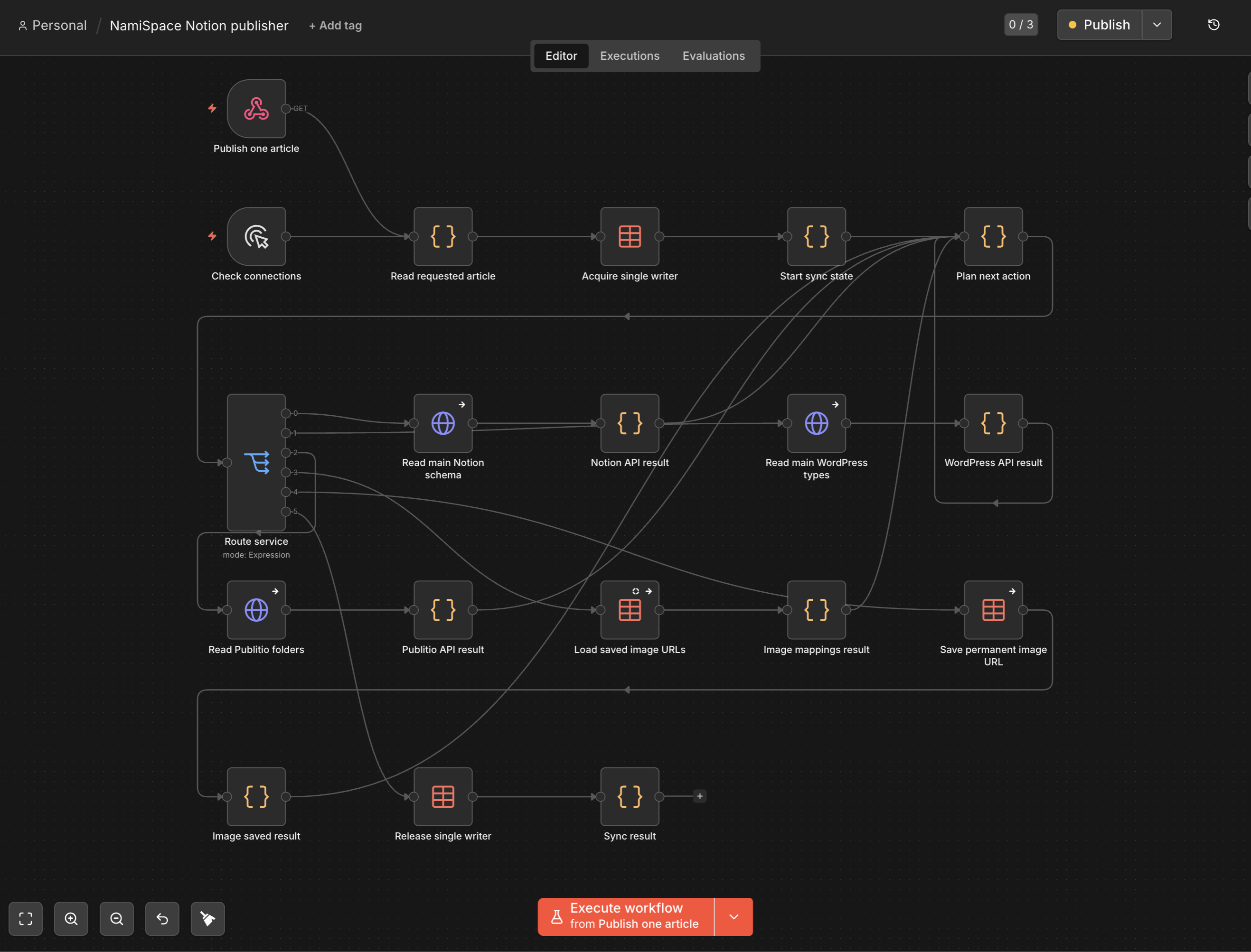
My n8n workflow checks the writing database every five minutes.

If it finds something marked Ready to sync, it takes the Notion page apart, converts its blocks into HTML that WordPress understands, processes the photographs, decides whether this is a new story or an update, sends it to WordPress, and then writes the result back to Notion.

A new story becomes a WordPress draft.

That was an intentional change from my older nami.space flow.

So post has a review stage.

I sync it first. I look at the actual WordPress draft. If everything is good, I choose Ready to publish.

Later, if I fix a typo or change a paragraph, Ready to sync updates the same WordPress post rather than creating another one.

The WordPress post ID gets written back to Notion, so the two records stay tied together.

This is the sort of boring infrastructure detail I love because it makes the human experience stupidly simple.
Photos turned into their own problem

Travel writing is obviously going to have more photographs than nami.space.

And Notion image URLs are temporary.

That meant I could not just tell WordPress, “good luck, here is whatever image URL Notion gave me.”

So I added Publit.io for image hosting layer.

When n8n sees a photo in the post, it downloads the original from Notion and uploads it into a permanent AFK folder in Publit.io.
Then I keep a media map that remembers which Notion image corresponds to which permanent Publit.io URL.

This means:

  • syncing the same story again does not upload the same photos again
  • changing a caption does not create a duplicate image
  • removing the image from the story does not randomly delete the permanent file
  • the article can use the Publitio image directly instead of depending on a temporary Notion link

The selected featured image works a little differently: the theme imports that one into the WordPress media library so WordPress.com can use it properly for archive cards and sharing metadata.

Article images stay on Publit.io.

This is probably over-engineered for a tiny little personal travel blog.

But it solves a real problem once, and then I never have to think about it while I am actually traveling.

I mean Codex did all the work using n8n MCP control.

The tiny features became the fun part

Once the basic pipeline worked, I started adding little things that only make sense because I know exactly how I want to write.

For example, I can put:

`[cover: top]`

inside the Notion story and the selected featured photo appears under the title.

I can wrap a group of images with gallery markers and the site turns them into a gallery.

I can write inline notes like:

`AutomatticA distributed company—we work from different places around the world.`

and the website turns that into a numbered footnote-style popover.

Captions can also include separate alt text.

Unsupported Notion blocks do not silently disappear. The sync stops and tells me there is a problem.

The best technology disappears

The funniest outcome is that after all this technical nonsense, my actual publishing workflow is:

  1. Open Notion.
  2. Write.
  3. Add photos.
  4. Choose Ready to sync.
  5. Review the draft.
  6. Choose Ready to publish.

I may go months without needing to open the WordPress editor.

(Which is the point!)

I built the system overnight so that, while I am moving through Spain, Morocco, Turkey, Sri Lanka, Vietnam and Taiwan, I can spend less time maintaining a website and more time actually having something worth writing about.

At least that is the theory.

It is day one.

nami.space / writing / i-built-a-headless-wordpress-pipeline-without-knowing-what-i-was-doing

I built a ‘headless’ WordPress pipeline without realizing what I was doing

· #project

[tldr]I don’t like working with WordPress editor for writing. (Or really any editor by all means) So I built a custom publishing pipeline using Notion, n8n, and Claude Code. [/tldr]

In my last post, I wrote about how an idle 2017 MacBook Pro triggered a weekend project where I bypassed managed hosting, learned SSH, and deployed my own web infrastructure on a VPS using Claude Code.

The next question for me was: how do you actually put this into use as an actual case study?

The result of that question was nami.space — my personal internet home. Not a portfolio (I have a separate site for that), not a brand site, and definitely not a newsletter funnel. It’s a living archive. A place to leave a record of what I notice: a technical writing essays, random non-performative thoughts, things that cannot go anywhere but here.

For a living archive to work, the barrier to publishing needed to be zero for me.

Friction: WordPress editor as publishing tool (or is this ‘me’ problem?)

WordPress is arguably the best CMS in the world for owning your own data. But actually writing in it? I struggled.

This has been my long standing friction point.

Logging into a dashboard, navigating to “Add New…” I don’t think anyone would use WordPress admin interface as a serious editor interface. I’m fairly certain people use Google docs, Word docs, etc. for real editing workflow.

Well. I don’t like writing in Google docs, Word docs, or Pages either.

I’ve been using Notion and I’m a big fan.

My needs are really simple: I just want to publish a quick, unpolished thought. I wanted to write where I naturally write (Notion) but keep the SEO, ownership, and structural benefits of WordPress.

So I questioned, “Is it possible to use Notion as editor but also CMS?” I wanted Notion to be my source of truth.

The developer term for this setup is “headless CMS.” The non-developer reality is that connecting Notion’s block API to the WordPress REST API usually requires writing a custom middleware application… the kind of thing that assumes you already know JavaScript, understand authentication headers, and can debug API responses.

I don’t know how to do any of that.

So I had Claude Code help me build one, using WordPress and n8n.

Firstly, what is n8n (and why self-host it)?

n8n is an open-source workflow automation tool like Zapier or Make, but you own the whole thing. You build workflows by connecting visual nodes on a canvas: a trigger here, an API call there, a code block in the middle. Each node does one job, and you wire them together into a pipeline.

What makes n8n different from Zapier is that you can self-host it. No monthly subscription tied to how many tasks you run. No vendor lock-in. No limits on executions. You install it on your own machine and it just runs.

My n8n is self-hosted on a 2017 MacBook Pro running Ubuntu. The same machine I wrote about in my last post.

This matters because the automation layer is usually where self-hosting projects fall apart. You build the site, you set up the server, and then you realize that connecting everything together requires either writing custom scripts or paying for a SaaS tool that charges per workflow run. n8n removes that trade-off. It gives you the visual builder of a managed service with the control of something you run yourself.

I should be clear: I didn’t set up n8n from scratch by hand. Claude Code helped me get it running in Docker on the MacBook, configure the Cloudflare tunnel, and troubleshoot the every little n8n issues I had like Notion and WordPress credential connections.

Site’s tech stacks

The site is built with a custom-coded WordPress theme (Tailwind CSS) by Claude Code.

I did lots of planning with Claude and mapped out everything: structure, contents, and how automation would work with WordPress x n8n in mind.

For this project, I am hosting the site on Pressable as I actually wanted to learn Pressable as product. But the publishing engine behind it has three layers:

  • The editor: Notion. Where I actually write.
  • The middleware: n8n, an open-source workflow automation tool I self-host on a home server.
  • The destination: WordPress REST API, which receives the formatted content and publishes it.

My goal was simple: write anywhere, publish without copy-paste.

Workflow

If you looked at the n8n workflow, you’d see that it doesn’t just blindly push text from one place to another. It acts as an intelligent router: parsing, formatting, mapping, and syncing content between two systems that don’t natively talk to each other.

Here is exactly what happens when I trigger a publish.

Step 1: The status filter. The workflow starts with a webhook. When triggered, it queries my Notion database and looks for any page where the status property is set to “Ready to publish” or “Update.” If it finds one, it pulls the page ID and moves forward. If nothing matches, it stops.

Step 2: Parsing the blocks.

Notion doesn’t hand you clean HTML. It hands you a deeply nested JSON object where every paragraph, heading, and bullet point is its own “block,” each with its own structure, annotations, and metadata. A bold word inside an italic sentence inside a bulleted list? That’s three layers of nested objects just to render one line.

I had Claude Code write a custom JavaScript node inside n8n that loops through these blocks and translates them into clean, semantic HTML: <p>, <h2>, <ul>, <blockquote>, <pre><code>. It handles rich text annotations (bold, italic, strikethrough, inline code, hyperlinks) and wraps consecutive list items in proper <ul> or <ol> tags instead of leaving them as orphaned <li> elements. It even handles images with captions, converting them into <figure> elements.

No bloated divs. No inline styles. Just clean content ready for a minimalist theme.

Step 3: Dynamic taxonomy and routing. My site has distinct sections — Notes (technical fragments), Writing (longer essays), and Travel (random travel stuff). In WordPress, these are Custom Post Types, each with their own REST API endpoint.

I mapped a dropdown property in Notion to these post types. The n8n workflow reads that property and dynamically changes which API endpoint it targets: /wp/v2/notes versus /wp/v2/writing versus /wp/v2/travel.

Tags work the same way. A separate code node takes the Notion tags, checks whether each one already exists in WordPress, and if it doesn’t, creates it on the fly before assigning it to the post. No manual tag management across two systems.

Step 4: The round-trip writeback.

Once n8n successfully publishes the article to WordPress, it takes the generated WordPress Post ID and the live URL and writes them back into the original Notion row. Then it changes the Notion status to “Published.”

Why does this matter? Because that Post ID permanently links the Notion page to the specific WordPress post. If I notice a typo a week later, I fix it in Notion and change the status back to “Update.” The workflow sees the existing Post ID and sends the content to the same endpoint with the ID appended — updating the existing article instead of accidentally creating a duplicate.

One status toggle. No logging into WordPress. No copy-paste. No duplicates.

What my publishing flow actually looks like

  1. Open Notion on my phone or laptop.
  2. Write the stuff.
  3. Select the post type (Notes, Writing, or Travel)
  4. Change status to “Ready to publish.”
  5. I then click on the webhook link to trigger n8n workflow

Seconds later, it’s live on nami.space — formatted in my custom theme, tagged correctly, with the live URL written back to Notion so I can find it later.

I don’t log into WordPress to publish anymore. I don’t deal with the block editor or page builder settings. The design is locked safely in the theme files, and my content lives cleanly in Notion, which is where I already spend my time.

What I built vs. What I wrote

I want to be honest about the division of labor here, because I think it matters for anyone considering a similar setup.

I designed the system. I decided that Notion should be the editor, that content should flow through n8n, that WordPress should receive clean HTML via its REST API, that the round-trip writeback should prevent duplicates. I defined the content types, the taxonomy mapping, the status-driven triggers. (And I also did a lot of AI chatting to understand what needs to happen based on my vision of course.)

Claude Code wrote the JavaScript. The block parser that handles Notion’s nested JSON. The tag resolution logic that checks WordPress before creating new tags. The conditional URL construction that routes to the right API endpoint based on post type.

I don’t write codes. But I knew exactly what it needed to do, how the data should flow, and what the failure modes would look like. When something broke, I just feed error message that I don’t understand.

What mattered: I had some understanding of WordPress like Custom Post Type, concept of WP REST API, n8n, workflow automation, and general idea on how Notion → n8n → WordPress could look like.

But I absolutely didn’t know how WP Rest API needs to be set up, how authentication works with n8n for each node, or what sort of data processing was needed.

WordPress as the quiet foundation

There’s an irony in this setup that I want to name.

I built a pipeline specifically to avoid using the WordPress editor. And yet WordPress is the reason the whole system works. It provides the REST API that n8n talks to. It handles the content modeling — Custom Post Types, taxonomies, slugs, excerpts, publish dates. It generates the RSS feed, serves the pages, manages the theme layer that makes everything look the way I designed it.

I didn’t escape WordPress. I escaped the dashboard. The CMS underneath is still doing exactly what it’s always done — being a reliable, extensible foundation for publishing on the web. I just found a way to interact with it that matches how I actually think and write.

For anyone in the WordPress ecosystem: this isn’t a “WordPress is dead” story. It’s the opposite. WordPress becomes more valuable, not less, when you treat it as infrastructure instead of an interface. Its REST API turns it into a headless publishing engine that any automation tool can talk to. The editor is optional. The system is not.

Takeaway

I’ve always dreamed of an easy, accessible publishing flow. When I was in high school, I blogged every day. And it lasted as long as it did because my workflow was dead simple: write it in email (while I was on train), save as draft, hit send to publish. That was it. No dashboard, no formatting decisions, no friction between the thought and the page.

Email publishing still technically exists. But time changed, and my writing habit changed with it. What stayed constant was the desire: write somewhere comfortable, publish without thinking about the machinery.

This pipeline is my adult version of that high school email workflow. I write in Notion. I change a status. It’s live. The machinery is more complex: Notion blocks, n8n nodes, WordPress REST API, tag resolution, round-trip syncing. But the experience is just as simple. The complexity serves the simplicity, not the other way around.

I had a vision for this. I knew exactly what I wanted. And I had the means to communicate that vision to an AI clearly enough for it to build what I couldn’t build myself.

But I also know my own limitations. I didn’t take the path of building this from complete scratch: picking a programming language, choosing a framework, handling security practices for a stack I’ve never worked with. I would have gotten lost in decisions I’m not qualified to make, and so would the AI.

WordPress was the constraint that made this possible. Not despite being opinionated, but because of it. It gave Claude Code a clear structure to work within: template hierarchy, REST API conventions, content modeling, authentication patterns. AI could focus on solving my specific problem instead of reinventing the foundation.

I’m learning that AI-enabled modern web development isn’t about knowing how to code every integration. It’s about knowing how to direct the flow of your own information: understanding the concepts, seeing the moving parts, and having enough AI literacy to use these tools as genuine collaborators rather than magic boxes.

If you can describe a system clearly enough, you can build it. And if you’re honest about what you don’t know, you’ll choose the right constraints to build it within.

nami.space / writing / im-not-a-developer-i-built-my-own-web-infrastructure-from-scratch-using-claude-code-and-wordpress

I’m not a developer. I built my own web infrastructure from scratch using Claude Code and WordPress.

· #project

What started as a silly project became a proof of concept.


[tldr] An idle 2017 MacBook Pro → home AI server → prompted me to question every tool dependency I had → I ended up rebuilding my entire web infrastructure from scratch. Three sites, 48 hours. Here’s what I learned.[/tldr]

I almost listed it on Facebook Marketplace. A 2017 MacBook Pro, Core i7, 16GB RAM, 1TB storage. It’s been just sitting there, worth almost nothing on the secondhand market. I figured I’d get maybe $200 for it if I was lucky.

Instead, I turned it into a home server. I installed Ubuntu as an OS (so I don’t have to deal with ‘forever outdated’ MacOS nonsense on perfectly fine machine). And that decision quietly unraveled every assumption I had about how I build and host websites.

I wanted to share my journey as I reflect on AI as operational layer, self-hosted web stacks, and open-source software.


Some background

Before I started working at Automattic five years ago, I was a self-taught WordPress designer. I’d grab an all-in-one theme with a page builder from CodeCanyon and find a way to make it work. No deep technical knowledge, just determination and a lot of googling like “how to deactivate plugin without admin access” (Answer: FTP).

Five years of supporting WooCommerce merchants gave me a different kind of education. I got comfortable debugging without documentation. Trying to understand how product works without reading codes. Finding workarounds in products that systems weren’t capable of.

That skill… being comfortable in dark, unmapped infrastructure, turned out to be exactly what this story is about.

Phase 1: Own your AI infrastructure

I installed Ubuntu on the old MacBook Pro, partly to give it a second life, partly because an outdated macOS would have been the bottleneck anyway. Then set up Open WebUI (connected to Claude, ChatGPT via API, and local Ollama models) and exposed it to the internet through Cloudflare Tunnels .

The goal was simple: move my personal AI usage from scattered subscriptions to one coherent stack I actually owned.

One honest caveat here: this only makes financial sense if your actual usage stays below what a subscription would cost. And that math is different for everyone.

For me, ChatGPT was the easy call; I wasn’t using it in any meaningful way, so paying per API call instead of a flat monthly fee was obviously better. Claude was more complicated. API access works well for conversational use through Open WebUI. But if you’re running Claude Code heavily (which I now am) the subscription starts to look attractive again, because Claude Code’s usage can add up fast.

So “owning your AI infrastructure” doesn’t automatically mean ditching subscriptions entirely. It means being deliberate: knowing which tools you actually use, how you use them, and what each model of paying for them actually costs you. For me, this process was a really good practice to see the AI usage more clearly.

But finishing that setup surfaced a more interesting question: If I can own my AI stack, what else can I do?

Phase 2: Own your digital identity

That question led me straight to my email setup. This has been bothering me.

I’d been personally with Hostinger for years (for my work, I have access to WordPress.com and Pressable.com); affordable and decent, and they held everything: my domains, websites, about 20+ email inboxes bundled into my hosting plan. Convenient. (And yes, I hosted sites for free for friends and family…)

If I ever wanted to switch hosts, I’d be dragging 20 inboxes through a migration. Email migration is painful enough when you’re doing it once, let alone repeatedly. (It’s not that bad until you really have to do it. Don’t let me start on the email migration stuff.)

So I decoupled everything:

  • All ~10 domains moved from Hostinger’s DNS to Cloudflare
  • Email moved entirely to MXRoute — each domain now has hosting-independent inboxes

It took about five evenings. It was a whole ordeal. But the result: Now my stack is lighter and I don’t have to worry about email migration when I want to migrate to another host. Or I can spin up sites anywhere and just point Cloudflare DNS wherever I need.

Phase 3: Own your development infrastructure

Once I’d decoupled domains and email, rebuilding my sites was the obvious next step.

My portfolio had been neglected for years. It was still running on Elementor with a pile of free Elementor add-ons (and let me just say third-party built Elementor add-ons are eviliciously quick at degrading), and half the stack no longer worked.

I decided to use it as a test case for a workflow I’d been curious about: WP Studio (local WordPress environment) combined with Claude Code.

The combination worked well. WP Studio gave me a clean local environment Claude Code could actually read and reason about.

Here is my general prompting in phases:

  • I first do “audit” phase where I let the Claude Code scan all the WordPress installation files of the old site. Then ask it to create “claude-audit.md” file of all the learnings it did.
  • Once that is done, then I nail down my aesthetics I envision. I tell exactly what I want, and based on claude-audit.md file, I have Claude Code first generate claude.md file that has all the system prompt about the new site build.

With this two step, Claude Code has access to contents as well as plans for the outcome.

My Claude Code-activated WordPress stack is pretty simple:

  • Build a custom theme with Tailwind. → No page builder bloat.
  • No unnecessary plugins. Just a clean theme doing exactly what I needed. (You definitely need a few plugins still, and I will touch more about that later on.)

I first let Claude Code build everything hardcoded. Everything static. Once I see the design, then I instruct it to turn the page into Block based or to use Custom Post Type.

Then there it is, vibe-coded WordPress site that does not use page builder or any plugins.

My next big question was; where does this go? I didn’t feel like pushing it back to Hostinger. So I built a new infrastructure layer:

Total: roughly $160/year, plus Claude API usage. I built two sites in one night and spent about $8 in API costs, just FYI.

The whole workflow looks like this: install WordPress files using WP Studio, spin up a WordPress app in Coolify (~2 minutes), point Cloudflare DNS to the VPS (~5 minutes), and push whole WordPress installation folders to Coolify via SSH. A fully functioning site without a single unnecessary plugin.

And by the way, WP Studio allows to sync directly from WP Studio to WordPress.com or Pressable.com. And I’ve also built a site this way and synced. It worked perfectly. So instead, workflow can look like this:

  • Spin up a local site via WP Studio
  • Use Claude Code to develop
  • Deploy directly to WordPress.com or Pressable.com hosted site

I have to be honest: I work at Automattic, so you might think I am trying to sell you Automattic-built products. But this workflow was an easy winner for me because it works so nicely. If I could test, I would test my workflow with Local WP or DevKinsta too. You get my point.

I’ve also tested the following workflow:

  • Pull WordPress site files via SSH to local files
  • Use Docker to set up ‘local dev site’ that’s live during editing via Claude Code
  • Whenever changes are made and ready, you can then push the confirmed changes to the server

Claude Code-assisted WordPress development works well with any host that gives you real, unrestricted SSH access, which is standard on VPS hosting and most developer-oriented hosts, but not guaranteed on shared or fully managed plans. So I don’t know how that would truly look like with a normal managed hosting.

What’s actually novel here

I want to be precise about this, because I don’t want to oversell this as ‘revolutionary.’ It’s a proof of concept.

None of the individual pieces are new either: VPS hosting, self-hosted WordPress, open-source panels like Coolify — these have existed for years. What changed is the combination:

  • An AI operator (Claude Code) that can SSH into a server, inspect containers, understand code at project scale
  • Structured context — audit files that let Claude understand a site as a system, not just as isolated files
  • Infrastructure you actually control — so the AI can participate in production safely
  • Speed that makes it practical — multiple sites rebuilt before lunch

Together, a solo builder could operate at a pace that previously required a team. (Well, frankly speaking, this was all impossible for me with the level of technical knowledge I have.) AI can now be a full participant in the development workflow — not just an assistant at the edges.

What this means for the WordPress ecosystem

None of the individual pieces here are new. VPS hosting, self-hosted WordPress, and open-source panels have existed for years. What changed is the combination:

  • An AI operator that can SSH into a server, inspect containers, and understand code at a project scale.
  • Structured context that lets AI understand a site as a complete system, not just isolated files.
  • Speed that makes custom development faster than visual clicking.

A solo builder with basic systems intuition can now operate at a pace that previously required an agency team. In retrospect, what I stumbled into has massive implications for the industry.

What Gets Shaky

  • Page Builders: They exist because non-technical users (like me) needed a way to customize sites without writing code. Page builders optimized for visual decision-making (click, drag, render). But AI codes faster than you can click. If I can describe what I want, get the code, and iterate in 30 seconds, the math no longer favors the page builder.
  • ACF: You can just build Custom Post Type or Custom meta fields directly with no technical knowledge.
  • Utility Plugins: If a plugin relies on 100 lines of code or less, Claude Code can build it directly into your theme in two minutes. The market for “does one small thing” plugins will contract significantly.

What Thrives

  • WordPress Core: WordPress is a CMS, and that doesn’t change. What changes is how it gets built. Custom theme development used to be slow and expensive; now it is fast and cheap. WordPress gets simpler, more flexible, and more essential.
  • WooCommerce: Commerce logic is genuinely complex—inventory, payments, taxes, refunds. AI can build the storefront, but it can’t architect the business logic. WooCommerce becomes the system you automate the building of, not the system you replace.
  • Any service layers such as: SEO, Ads, Marketing integrations, Security, Caching/Optimization, MAM …
  • Infrastructure Layers: Cloudflare is becoming the default outermost layer of the web. Cheap VPS providers and control panels like Coolify will surge in value as developers seek performance without platform lock-in.

The real change is coming

When implementation becomes more affordable, competitive advantage shifts entirely to judgment.

What should the site actually do? What content matters? What is the brand direction? The person who can direct the system effectively becomes vastly more valuable than the person who just operates the tools.

The common narrative is that AI makes web development easier. My version, after living through this, is that AI has become part of the operating system—entirely changing how WordPress sites will be built going forward.

I have a fine arts degree. I’ve never called myself a developer. But I am good at understanding systems, debugging, directing AI, and making judgment calls about design. That combination—system intuition plus AI fluency—turned out to be enough to own and operate a complete web infrastructure stack.

The barrier to this specific way of working just collapsed. And it’s only one prompt away from being unlocked for anyone willing to ask.

nami.space / writing / complexity-isnt-the-bug-its-the-point

Complexity isn’t a bug. It’s the point.

· #commerce

I interact with WooCommerce all day everyday.

Developers call it bloated. Competitors call it legacy. New entrants (like FluentCart) arrive promising to strip away the complexity and deliver something clean, fast, modern. And every few years, someone tries to build a simplified version. (I am not excluding Woo itself.)

I pull my hairs out just thinking over some weird quirks I might have to work on that day. Yes, I stopped counting how many times I felt I was gaslit by WooCommerce just by how I missed a small setting that was so ‘obvious’ that I should know better.

Jokes on you. Settings don’t mean anything to me, so I just quit remembering them.

Complexity isn’t a bug. It’s being human.

WooCommerce succeeded because business and commerce are made of regulations and complexities. Every moving part is messy. Taxes vary by jurisdiction, product type, customer location. Shipping has zones, weight classes, carrier rules, dimensional pricing. Variable products have size, color, material, inventory per variant, backorder rules, sale pricing schedules.

And that’s just online side. Merchants have to think everything through as a whole operation outside of online stuff.

That’s the reality of real business. The WooCommerce looks complex because commerce is complex. Stripping that away doesn’t simplify the merchant’s life — it just makes the platform incapable of holding their actual business.

We are not going to solve the complexity of taxes or shipping because that’s just how they are. They’re human systems — regulatory, regional, historical, negotiated. The software that pretends otherwise isn’t simpler. It’s just incomplete.

Calling WooCommerce ‘flexible’ is an understatement. It has the capacity to hold the mess — and that’s exactly what real commerce needs.

Merchants are not clueless. Don’t assume they are.

Most business operators are literate in many aspects of their operation. A shop owner running a t-shirt business understands variants, inventory, wholesale pricing, tax exemptions… They didn’t learn these things from WordPress. They are bringing their knowledge to it, and judging if the tool simply works for them or not.

Sure, there are people who might wake up one day and say “Imma start selling my 3D printed keychains” and they might just need a simple setup. But they will eventually grow to learn these operational side of business to make their vision come true. Platform isn’t gonna give you everything they need. While these platforms pretend like they are the all-in-one solution.

And that savviness of users is hidden gem that no one notices.

It’s why the commerce ecosystem thrives, why extensions get built, why people documents to share with others, why workarounds get shared. The platform and the user base co-evolve.

This is what gets overlooked when simplified alternatives target “frustrated WooCommerce users.”

WordPress already solved the hardest problem.

WordPress already solved user roles, editing, media management, content ownership, plugin ecosystem, the developer-to-operator handoff, and 20 years of accumulated solutions to problems that felt mundane the moment they were solved.

Developers choose WordPress not because they love it, but because their clients can use it after they do the hand-off. It’s a people-centric, people-enabling platform. The deliverable isn’t a website—it’s a website plus the ability for a non-technical person to own and operate that website indefinitely without a developer on call.

The question doesn’t change. Only the technology does.

People are going to question and land on the same answer: “Why build a WordPress site when Claude Code can make static sites without needing WordPress?”

Because the end user needs to edit and operate. The issue that WordPress solved 20 years ago is still relevant — because the human world hasn’t changed. If anything, things will get further complex over time.

A developer or an AI agent can build anything. But when building is done, who operates it? The merchant. The blogger. The business owner who knows their inventory intimately but has never opened a terminal. That person needs to edit a product description at 11pm. Process a refund when a customer complains. Change store hours before a holiday. None of that is a development task. All of it is a business operation.

And here’s the quiet irony: AI-assisted development actually reinforces the WordPress case rather than threatening it. The build cost collapses. But the daily, ongoing operation by a non-technical human stays constant. So the ratio of time building to time operating shifts dramatically toward operating. Which makes the operator experience more important, not less.

Every generation of developers looks at WordPress and sees it as legacy blogging platform or even feel second-hand embarrassment for thinking about WordPress as framework.

Blogging or not, the 20-year-old problem is still the problem even to date.